SmartPack - packing lists
- 4.0
- Rating
- 10.00K
- Installs
- Free
- Price

 Analysis by App-foxy
I started using SmartPack because packing is one of those small jobs that becomes surprisingly stressful when several people are involved. A weekend away, a family visit, or even a work trip can turn into a last-minute search for chargers, medication, documents, and weather-appropriate clothes. This free travel and local app from Acquasys takes a more deliberate approach: instead of asking me to remember everything from scratch, it gives me a place to build and reuse packing lists.
My first impression was that it is aimed at people who want more control than a quick note in a phone. The app is described as customizable, and that is the part that matters most in daily use. I can think about packing by trip rather than by one permanent checklist, which makes it easier to separate a short city break from a longer holiday or a trip with specialist equipment. It is not trying to replace a booking app, map, or itinerary planner. Its job is narrower, and that focus is useful.
How it fits into a shared household routine
The most convincing use case for me is a household preparing for one journey together. Imagine two adults and a child leaving on Friday morning. A single generic list is rarely enough: one person needs work clothes, another needs toiletries, and the child needs school-related items or comfort objects. SmartPack can be useful as a central planning space, but I would treat it as a checklist that people consult together rather than assume it automatically coordinates everyone.
You May Also Like

 Pandora - Music & Podcasts
Pandora’s Music Is Easy to Start, but Harder to Recover
Pandora’s strength is its low-effort path from a seed to a station. Its weak spot is how much confidence it asks you to place in connection, setup, and quiet recovery.

 8 Ball Pool
8 Ball Pool Is Built on Rivalries, Rematches, and Routine
A close look at the rivalries, rematches, shared routines, and unanswered safety questions that turn a quick pool match into a persistent mobile community.

 Samsung Music
Samsung Music’s Quiet Strength Is Playing What You Already Own
Its reach comes less from spectacle than from dependable access to a personal library. That simplicity is both the app’s strongest retention engine and its ceiling.

 AccuWeather: Weather Radar
AccuWeather Review: A Quick, Clear Forecast for Everyday Decisions
For everyday plans, the best forecast is the one you can understand quickly. AccuWeather makes rain timing, radar, and local conditions easy to act on, with a few trade-offs.

 Hill Climb Racing
Why Hill Climb Racing Still Turns Crashes Into One More Run
A tiny car, a bumpy hill and one more upgrade: Hill Climb Racing keeps resurfacing because its simple chaos makes every near-miss feel personal.

 AliExpress - Shopping App
AliExpress Makes Global Shopping Feel Personal, but Shoppers Bear the Risk
AliExpress turns a global marketplace into a pocket-sized discovery engine. Its reach is useful, its shopping loop compelling, and its trade-offs easy to miss.
More From Our News Desk
View All News


That distinction is important. The app gives me a structured way to think through what needs to be packed, but a list does not by itself prove that an item has been placed in a particular suitcase. For a shared trip, I would divide responsibility in the list itself through clear wording, such as “adult one,” “child,” or “carry-on,” if the app’s customization options allow that arrangement. I would also do a final spoken check before leaving, especially for passports, medicine, keys, and electronics.
In a realistic evening-before-departure scenario, I would open the relevant trip list, work through the essentials first, and then use the remaining time for optional items. That order is more valuable than simply collecting a long inventory. A forgotten charging cable is inconvenient; a forgotten prescription or travel document can change the whole trip. SmartPack works best when I use it to expose those priorities instead of treating every checkbox as equally important.
For a couple sharing a device, the approach is straightforward. One person can prepare the list while the other checks physical items. The benefit is that the conversation becomes concrete: rather than asking “Did we pack everything?”, we can ask whether the documents, toiletries, clothing, and devices on the list have each been handled. I would still avoid assuming that the app provides live collaborative editing or automatic synchronization between separate phones, because those are different functions from maintaining a customizable packing checklist.
Building lists that remain useful after the first trip
The real time saving comes from creating a system that can be reused. I would begin with a broad personal list, then make smaller variations for different kinds of travel. A short overnight trip needs a different rhythm from a beach holiday, a business visit, or a journey involving sports equipment. Keeping those purposes separate prevents a common problem with packing notes: a huge list becomes so familiar that I stop reading it carefully.
One practical technique is to organize the list around moments of use rather than only around object types. Items needed during the journey, such as identification, headphones, snacks, or medication, deserve attention before items that can stay in the main luggage. Another useful distinction is between “pack before leaving home” and “check before locking the door.” The second group might include chargers still plugged into the wall, food in the refrigerator, or windows that need checking. Even if those entries are not conventional packing items, they reflect how people actually prepare for travel.
I also found that customization can work against me if I add every possible object. A list should reduce mental load, not become another project to maintain. I would keep recurring essentials stable and add special items only when a particular trip justifies them. That trade-off is one of the app’s strengths and weaknesses at the same time: flexibility is valuable, but it rewards users who are willing to curate their lists.
For shared use, I would add ownership directly into item names when needed. “Pack spare glasses in parent bag” is clearer than “glasses,” especially when several people are moving around the same room. This is not a substitute for a dedicated family organizer, but it is a simple workflow that makes a single checklist less ambiguous. It also helps when a person is packing for someone else and needs to know which bag or suitcase should receive the item.
What setup feels sensible, and where the boundaries are
SmartPack is available as a free app, which makes it easy to try without committing money at the start. Its current version is 2.9.3, and it runs on Android from version 8.0 onward. Those details make it approachable for people using an older Android phone, although I would still check compatibility on the specific device before planning a trip around it.
The app has an Everyone content rating, so its subject matter is suitable for a broad household audience. That does not mean every child will find list management enjoyable, and it does not create a special child account or supervision system. For younger users, I would use it with an adult and keep sensitive information out of item labels. A packing list may contain clues about travel dates, medication, or valuable equipment, so the phone itself should be handled with the same care as any other personal device.
There are in-app purchases priced at $3.99 per item. I would approach those purchases as optional decisions rather than assume they are necessary for the basic experience. Before paying, I would first build a real list, use it for an ordinary trip, and decide whether the extra customization or capability solves a problem I actually have. That is especially sensible in a household where only one person may be doing the planning.
The account boundary is also worth considering. I would not assume that a list made on one phone will automatically appear on every family member’s device, nor would I treat the app as a shared cloud workspace without checking how the current version handles storage and sharing. For a single-device household routine, that limitation may not matter. For a family spread across several phones, a note or task service designed around explicit collaboration may be more convenient.
My setup advice is to keep the first list deliberately small. I would include documents, medication, essential clothing, toiletries, chargers, and anything that would be expensive or difficult to replace. After using it once, I would add the items I genuinely missed. This produces a list based on personal travel habits rather than an imagined perfect packing system. It also makes the app faster to use when departure day is busy.
Coordinating people without creating extra work
A packing app is most helpful when it turns vague responsibility into visible responsibility. If one person assumes another packed the power adapter, the checklist has failed as a coordination tool. I would therefore use separate wording for shared items and personal items. “One universal charger” suggests a group responsibility; “personal medication” clearly belongs to one traveler. That small distinction prevents duplicate packing in some cases and dangerous assumptions in others.
For a family trip, I would run through the list in three passes. First, I would identify items that cannot be replaced easily. Second, I would check things needed during transit. Third, I would handle comfort items and optional extras. This makes the app part of a workflow rather than the whole workflow. SmartPack is good at holding the checklist, but the judgment about priority still comes from me.
Another useful habit is to check the list at different times instead of only once. I would review it while planning, again while packing, and once more just before leaving. The first review reveals what needs buying or washing. The second confirms that items have been placed in luggage. The last catches things that were removed for use overnight. This is particularly useful in a shared home, where someone may take a charger or toiletry item after the main packing session.
I would also avoid making one list responsible for every traveler’s personal preferences. A shared master list can cover group essentials, while each person can maintain their own smaller routine if the device arrangement permits. That keeps the common checklist readable. If the household uses only one phone, I would mark personal items clearly rather than creating a confusing stream of initials and abbreviations.
Compared with a paper list, SmartPack is easier to revise and reuse. Compared with a basic notes app, its purpose is more focused, so I spend less time formatting a checklist from the beginning. On the other hand, a notes app may be preferable when several people need to edit the same document simultaneously, attach detailed instructions, or combine packing with reservations and schedules. SmartPack’s advantage is concentration; its trade-off is that it should not be mistaken for a complete household coordination platform.
Age, trust, and sensible information sharing
The Everyone rating makes the app comfortable to consider for general family travel, but I would still introduce it according to the child’s age and responsibility. A young child can help tick off familiar items with an adult nearby. An older child or teenager may be able to maintain a personal list, but I would review it together before departure. The goal is to teach preparation, not to hand over responsibility for critical documents or medication without supervision.
I would be careful with labels containing private details. A simple entry such as “medicine” is usually more sensible than writing a full medical description in a visible list. Likewise, I would avoid putting account passwords, access codes, or unnecessary financial information into a packing checklist. The app is designed around travel preparation, not secure credential storage, so sensitive data belongs in tools intended for that purpose.
Trust matters in another way: checking an item in the app is not the same as verifying it in the bag. In a household, one person may tick an item while intending to pack it later, while another assumes the job is finished. I would use the checklist status as a prompt for a physical check, especially for shared luggage. This simple rule prevents false confidence and is one of the most important habits when several people rely on the same list.
For older relatives who are less comfortable with complex apps, the focused purpose may be helpful, but I would not make the tool a barrier to participation. A printed backup or a spoken review can be more practical than expecting everyone to interact with the same device. SmartPack can support the household’s process without becoming the only way people are allowed to prepare.
Where it falls short for particular travelers
I would not choose SmartPack as my main travel tool if I needed bookings, live transport updates, route planning, or a shared family calendar in the same place. Its value is in packing preparation, not in managing the entire journey. A broader travel organizer may be a better fit for someone who wants reservations, schedules, maps, and checklists connected together.
I would also hesitate if my main requirement were real-time teamwork across multiple devices. The app may still be useful as a personal planning tool, but a collaboration-first task service is more suitable when several people must assign, comment on, and confirm work remotely. That is a meaningful distinction for families traveling from different homes or for groups where no one person owns the final packing process.
There is also a maintenance cost. A customizable list becomes less useful when it contains outdated items, duplicates, or things added for a trip that never happens again. I would review it after each journey and remove entries that create noise. Users who dislike maintaining recurring checklists may prefer a very simple note, even if that means rebuilding the list each time.
Finally, I would not rely on any packing app alone for high-consequence preparation. Documents, medication, mobility equipment, and essential communication devices deserve a separate physical check. The application can make the check more systematic, but it cannot inspect the suitcase, remember a last-minute change, or notice that an item was taken out after being marked complete.
My household verdict after using the approach
SmartPack is a sensible choice for people who repeatedly travel and want something more purposeful than a blank note. Its free entry point, broad age rating, and compatibility with Android 8.0 or later make it easy to test at home. Acquasys has kept the idea focused on packing, and that focus is exactly why I can see it becoming useful in a regular travel routine.
The app is especially well suited to a household that packs from one shared phone or uses a clear, agreed process. I like the ability to shape lists around different trips, separate personal and group responsibilities, and build a routine that catches forgotten essentials before the door closes. The strongest result comes from thoughtful list design, not from simply adding more entries.
Its average rating is 4.0 from around a hundred and seventy ratings, with over ten thousand installs, which suggests a modest but established user base rather than a tool I would choose because of massive popularity. I would judge it on fit: if I need a dedicated packing assistant, it makes sense to try; if I need collaboration, itinerary management, or detailed household task control, another category of app may serve me better.
My final recommendation is to start with one upcoming trip and a short list of genuinely important items. Use it once, notice where the household still gets confused, and customize only those areas. The best way to use SmartPack is as a shared preparation habit, not as a promise that the app will organize everyone automatically. For that focused purpose, it can turn a rushed pre-trip scramble into a calmer, repeatable routine.
FAQs for SmartPack - packing lists
01What is SmartPack - packing lists used for?
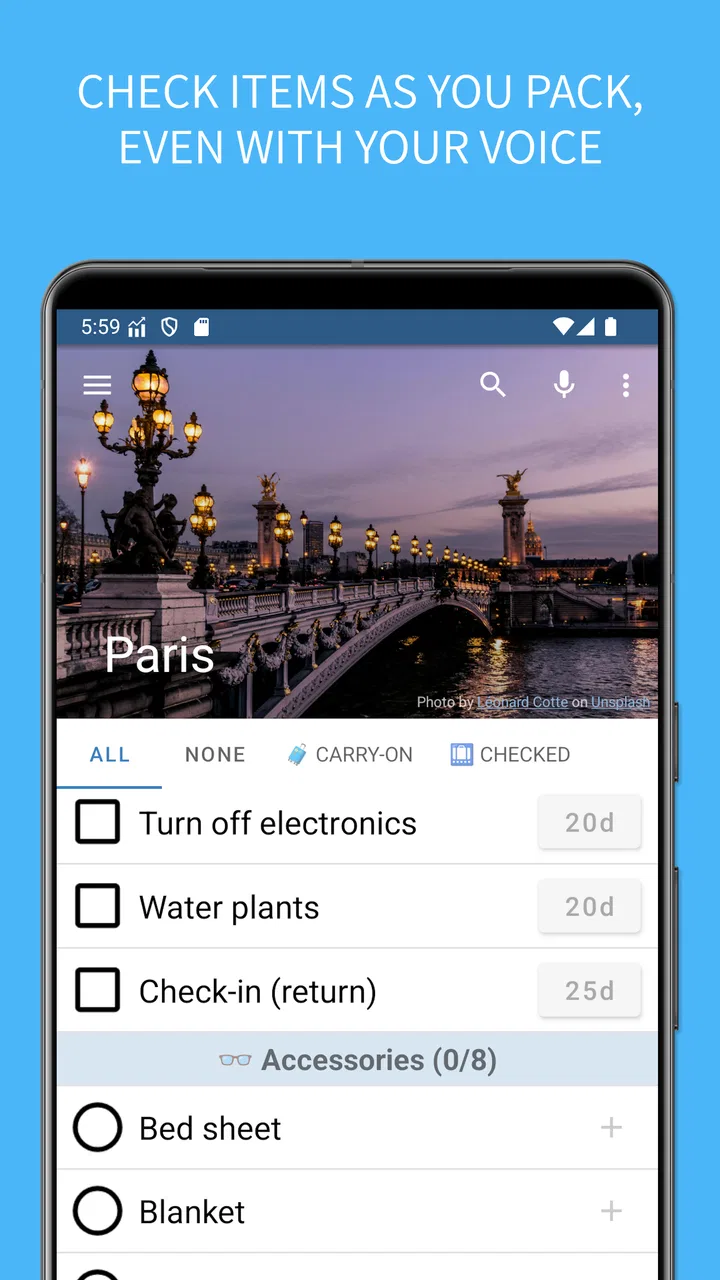
SmartPack - packing lists is designed to help you prepare for trips, holidays, business travel, camping, and other activities without forgetting important items. You can create and organize packing lists, separate belongings by categories, and check items off as you pack. It is especially useful for people who repeatedly travel or want a more structured alternative to writing lists on paper or in a basic notes app.
02Can I create customized packing lists for different trips and activities?
Yes. One of SmartPack’s most useful features is the ability to create lists that match your specific plans. You can prepare separate checklists for a weekend away, an international vacation, a business trip, or outdoor activities. This makes it easier to include clothing, documents, toiletries, electronics, medication, and other personal items based on the destination, duration, and type of journey.
03Does SmartPack work offline while I am traveling?
Packing lists are generally most useful when they remain available without an internet connection, particularly at airports, hotels, or destinations with unreliable mobile data. SmartPack is intended for managing your lists directly on your device, so users should be able to review and update packing progress offline. However, features that depend on synchronization, backups, advertisements, or external services may require an internet connection.
04Is SmartPack - packing lists free to download and use?
The app may be available to download without an upfront charge, but the exact pricing model can depend on the Android or iOS version and the developer’s current store listing. Some functions may be free, while advanced options, advertising removal, or additional customization could require an in-app purchase or subscription. Check the official store page before downloading for the latest details.
05Is SmartPack suitable for families or shared travel planning?
SmartPack can be useful for families because each traveler can have items organized into a clear checklist, helping parents manage children’s clothing, documents, medication, and personal essentials. It is also practical for group trips when responsibilities are divided. Before relying on it for collaborative planning, check whether your version supports list sharing or synchronization, since these features may vary by platform and app release.
Pros
- Creates reusable packing lists for frequent trips.
- Supports detailed item categories and custom entries.
- Helps track packed items and avoid forgetting essentials.
- Useful for organizing different trips in one place.
- Lightweight design makes list management quick and practical.
Cons
- Some advanced features may require in-app purchases.
- The interface can feel dated compared with newer travel apps.
- No built-in booking or itinerary management tools.
- Users may need time to customize lists for specific trip types.
- Cloud syncing or backup options may be limited depending on the version.

SmartPack - packing lists
Gallery